🏷️ Label & Sticker Sheet Maker
Design a label, pick your label sheet, and print — address labels, product stickers, jar labels and name tags, lined up with the sheet.
1 · Label sheet
Pitch = distance from the left (or top) edge of one label to the same edge of the next. Measure your sheet with a ruler.
2 · What's on the labels
"Start at" skips labels you've already used on a part-used sheet.
3 · Design
4 · Print
Tip: print one page on plain paper first, hold it against a label sheet up to the light, and nudge if your printer is slightly off.
💡 In the print dialog choose Actual size / 100% and your printer's Labels paper type. Turn off "Fit to page", or the labels will drift down the sheet.
Label sheet sizes
Match the number of labels and the label size printed on your pack. These sheet layouts are built in:
| Paper | Labels | Label size | Same layout as code |
|---|---|---|---|
| Letter | 30 per sheet | 2⅝ × 1 in | 5160 |
| Letter | 20 per sheet | 4 × 1 in | 5161 |
| Letter | 10 per sheet | 4 × 2 in | 5163 |
| Letter | 6 per sheet | 4 × 3⅓ in | 5164 |
| Letter | 80 per sheet | 1¾ × ½ in | 5167 |
| A4 | 21 per sheet | 63.5 × 38.1 mm | L7160 |
| A4 | 24 per sheet | 63.5 × 33.9 mm | L7159 |
| A4 | 65 per sheet | 38.1 × 21.2 mm | L7651 |
| A4 | 16 per sheet | 99.1 × 33.9 mm | L7162 |
| A4 | 14 per sheet | 99.1 × 38.1 mm | L7163 |
| A4 | 10 per sheet | 99.1 × 57 mm | L7173 |
| A4 | 8 per sheet | 99.1 × 67.7 mm | L7165 |
Any other sheet works too — choose Custom layout and type the label size, margins and spacing. For round or shaped stickers on blank sticker paper, use the full-sheet sticker layouts and tick “Print label outlines” for cutting guides.
How to print address labels from a list
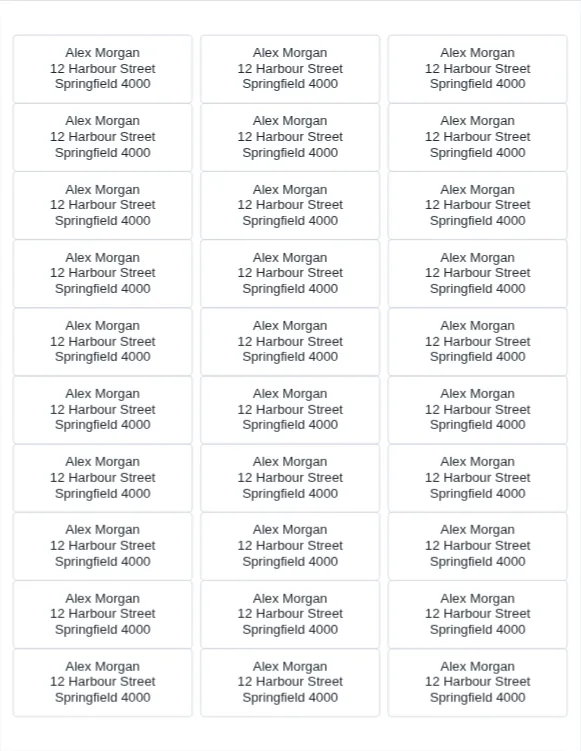
- Choose your label sheet, then A list (addresses).
- Paste your addresses with a blank line between each one.
- Pick a font, add a logo if you like, and download the PDF.
- Print one page on plain paper first and hold it against a label sheet to check the alignment.
About the Label Maker
📐 Lined up with real sheets
Layouts match the most common label sheets: 30-up 1 × 2⅝ inch address labels, 21-up and 14-up A4, shipping labels, return-address and more — or enter your own sheet's measurements.
📬 Mail merge without the hassle
Paste a list of addresses with a blank line between them and each one lands on its own label, across as many sheets as it takes.
🔢 Numbered labels
Raffle tickets, inventory tags, storage boxes: number labels in sequence with your own text before and after, like "Box 001".
🎨 Logos, fonts and colours
Add your logo beside, above or behind the text, choose a handwritten or classic font, and set the text and background colours. Text shrinks automatically to fit.
♻️ Use up part-used sheets
Start printing at any label on the sheet, so the leftovers from last time don't go to waste.
🔒 Nothing uploaded
Your addresses and images stay on your device — the PDF is made in your browser.
Frequently Asked Questions
Which label sheets does this work with?
The layouts match the common sheet sizes sold by most label brands, including 30 labels per Letter sheet (1 × 2⅝ in, the 5160 size), 21 per A4 sheet (63.5 × 38.1 mm, the L7160 size), 2 × 4 inch shipping labels and more. Check the label size and count on your pack. If your sheet isn't listed, choose Custom layout and type its measurements.
Why are my labels slightly off?
First make sure the print dialog is set to Actual size / 100%. If they are still off by a millimetre or two, your printer feeds the paper slightly differently — use the Nudge boxes to shift everything right or down (negative numbers move left or up), test on plain paper, then print on the labels.
How do I print a different address on each label?
Choose A list, paste your addresses and leave a blank line between each one. Every address gets its own label, filling as many sheets as needed. If your list has one name per line, tick "Each line is its own label".
Can I make round stickers?
Yes. Choose one of the round sticker layouts for full-sheet sticker paper, or a custom layout with the circle shape. Tick "Print label outlines" to get cutting guides.
Is my address list private?
Yes. Everything runs in your browser; the list and any logo you add are never uploaded. Your address list is never put into a link. The single-label text is added to the page address only when you press "Copy link", so don't share that link if the label shows a private address.
How do I print labels without Word?
Design the label here, choose your sheet layout and download a PDF. Print it at Actual size on your label sheets — no word processor or mail-merge setup needed.
Can I print just a few labels on a used sheet?
Yes. Set “Start at label #” to the first unused label and the tool skips the ones you’ve already peeled off.