📸 PDF to JPG Converter
Turn PDF pages into high-quality JPG or PNG images — converted entirely in your browser, your file never leaves your device
Drag & drop a PDF file here
or
One PDF up to 100 MB and 200 pages. Nothing is uploaded — conversion happens on your device.
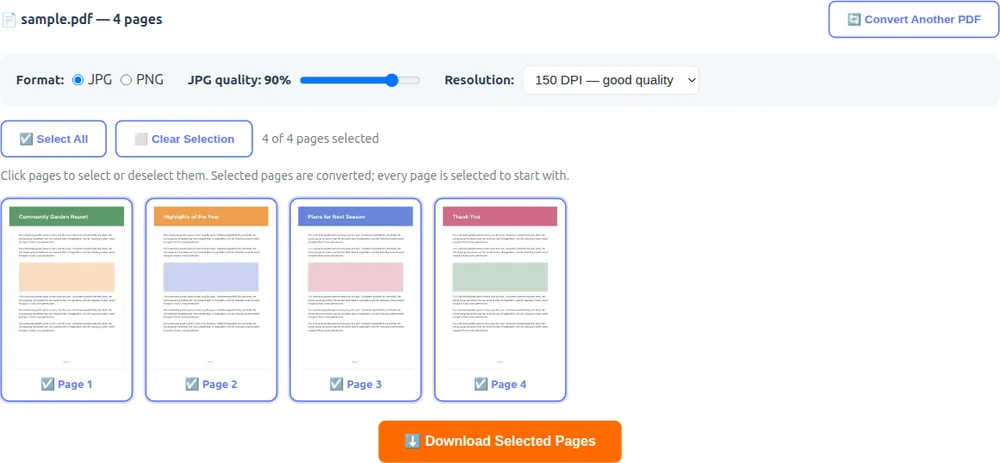
Click pages to select or deselect them. Selected pages are converted; every page is selected to start with.
About the PDF to JPG Converter
🔒 100% Private
Your PDF is converted directly inside your browser using JavaScript. Nothing is uploaded — your document never leaves your computer or phone.
🖼️ JPG or PNG Output
Export pages as JPG for small, universally supported photos of your pages, or PNG for lossless quality — ideal when the page contains sharp text or line art.
🎚️ Quality & Resolution Control
Pick 72, 150 or 300 DPI and fine-tune JPG compression. 150 DPI is great for sharing on screen; choose 300 DPI when you plan to print the images.
📑 Convert Only the Pages You Need
Every page shows up as a thumbnail — click to select or deselect. One selected page downloads as a single image; several arrive together in a ZIP file.
🔁 Need the Other Direction?
Turning images into a PDF instead? Use our JPG to PDF Converter. You can also merge, split and reorganize PDFs or edit a PDF directly.
🛡️ Password-Protected PDFs
Encrypted or password-protected PDFs can't be opened. Remove the password first, then add the file again.